Sunday, April 11, 2021

DDTTX Flag

  _____

     `.___,'
      (___)
      <   >
       ) (
      /`-.\
     /     \
    / _    _\
   :,' `-.' `:
   |         |  ~~~~MAGIC~~~~
   :         ;
    \       /
     `.___.' 


#PandaChipsPWND
#StPutinsGloryPWND
#ZippeNuclearPWND
#AICHAINPWND
#ImhotepBankPWND


THESE ARE YOUR TRAINING SECRETS OMG YOU FOUND THEM

+3 hit points

Tuesday, October 9, 2018

Inaugural Mental Health & Wellness Workshop at Derbycon8

This year was the first ever (as far as I can tell) Mental Health & Wellness workshop at an information security conference. For those of you that haven't heard my Hackers, Hugs, & Drugs talk a little background is called for first. I've been struggling with anxiety and depression since my mid-teens in one way or another. Poor relationships did nothing but fuel the issues I was already having. When I started interacting with the infosec community about 6 years ago I started feeling a sense of belonging. Through my trials with different medications and coping mechanisms I've started to get a little more of a handle on (or at least a better awareness) of my own mental health. I consider this community my family, more so than most blood relation that I have. This has been the first group of people that understand me and you understand others around you. When I began tweeting, posting, and talking to people at cons about anxiety, depression, and other mental health issues I realized that there are a LOT of people here that not only are struggling with this type of stuff, but trying to tackle it alone like I did for a good 10 years or so. I've had amazing conversations with some super smart and personable people, that you'd never imagine would be struggling. The kind of people that look like they have it together. I want to continue this conversation and try to make it as public and without stigma as possible.


After a year and a half giving this talk at various conferences and meetups I continued to be awestruck at the overwhelmingly positive responses. Each time I would think "Ok, maybe I've given this speech enough", I would have another person come up to me to talk about how it lead them to go get some counseling, or to change their minds about self harm or suicide. After hearing story after story I thought it would be good to continue these efforts at a larger scale. While I love speaking, it only reaches a certain number of people. We needed more. That is when the idea of the workshop came about, and honestly it did turn out to be more of a village with smaller workshops inside of it. After pitching the idea to Derbycon and getting accepted the idea started to take shape. The gofundme campaign was created and earned around $7,000 for not only this particular instance, but to donate to charity what we had left over (more details at the end, so keep reading obviously).


This room turned into something more than I could have ever envisioned. I wanted to help others by providing a quiet space and some information but it sometimes morphed into a therapeutic sharing session and conversations that I even have a hard time explaining. Our four massage therapists were never not busy, so definitely expect to see them back again next year. We fidgeted, colored, created, napped, hugged, cried, ate, and meditated; all with friends and family surrounding us in a positive and calming environment.


None of this would have been possible without the amazing help of all of the volunteers that signed up, and some that didn't really even sign up but were roped in one way or another. I'd like to especially thank @click_wire for helping with almost every aspect at the conference, and keeping me from having a few ongoing breakdowns myself. @v33na for giving us her yoga and meditation expertise as well as leading a group discussion on self care and emotional intelligence. @andMYhacks for covering some time management skills as well as always checking in and being on top of things (not just the air loungers). @JaysonStreet for his deeply touching and heart wrenching talk, he sure knows how to command a room. The responses and interactions with him as our final speaker left the whole room in tears. @0rphik for all of the help setting up and continued interaction and compassion to others around you, for those that weren't crying after Jayson was done, they were when you spoke (oh, and thanks again for the book #squee). @RayRedacted for the immense amount of help and positive interactions you brought to the room as well as an awesome talk on bringing light to our lives. Both @Tr0phywifehacks and @S1r3nn for bringing your supplies and knowledge and helping so many people with it.


Our speakers and discussion group leaders @dakacki, @investigatorchi, @f0zziehakz, @brentwdesign, @ZanshinH4x, @Integgroll, @hoshin, @Blenster, @SteveGroark, @bsdbandit, @5urv1va7rix (and her amazing service dog Trevor) who not only shared personal stories, but listened to yours and taught us a lot of amazing information that wouldn't normally be covered at a conference like this.

Our volunteers that watched the room, checked up on things, and were just amazing overall @oncee, @mr_minion, @SirgurdWV, @landonchelf, @secbuff, @cillic, @EricGershman and his wife Tina, Cherie, Val & my favorite puppy Fava. We also couldn't have gotten this far without the help of @HackingDave, @Karl_Creepy, Dave DeSimone and the rest of the @DerbyCon crew. Not to mention the inspiration I've gotten from @mubix with #hackingtogether and @ihackedwhat.


Also, for those of you that poured your heart out, found help, connections, friends, family, support, and whatever else you may have needed or felt like you could give at the time. I love you all and can't wait to see you again!!!!


Some final numbers and information about the workshop:

GoFundMe Info

  • Total Views: 1571
  • Total Donors: 28
  • Total raised: $7,026
  • Donating to Charity (Brain & Behavior Research Foundation): $1,321


Workshop

  • 22 volunteers
  • 8 presentations
  • 7 group discussions
  • 2 hours of yoga
  • apx 120 chair massages given
  • gallons of tears
  • 1 flattened Lintile


Up Next

  • Looking for corporate sponsors - If you're interested in donating or volunteering in any way we're looking to switch from a gofundme to corporate sponsors in some shape or form. Feel free to contact me through here or twitter.
  • Headed to @DachFest in Munich to run this again
  • Possibly doing this as a village for @BsidesLV and more

Tuesday, January 23, 2018

HIPAA vs Security: Building security into medical purchasing decisions


What the security community says about a specific industry vertical usually holds true for a good percentage of what is seen in the wild. You can ask any hacker, defender, CISO, etc what industries struggle the most and there are common themes in their answers. Top of the list includes healthcare, manufacturing, government, and financial. Some of the most heavily compliance controlled and regulated are also some of the least secure. Why is this? Is it due to administrators and senior management taking compliance standards as gospel? Maybe it’s a lack of knowledgeable staff like the blind leading the blind.


Rapid technology growth in the healthcare space definitely has not helped. Decision makers are slowly working security practices into business initiatives, but that doesn’t account for all of the security debt that has built up in this technology boom. So now what? How can business work to quickly protect their customer’s data, their own data, their products, while still doing what they do best? Do not fall into the habit of performing tasks, going through routines, or completing configuration with the mindset of “This is how we’ve always done it.” That type of mindset will only hinder progress and decrease security posture in the long run.

Humans are allergic to change. They love to say, “We’ve always done it this way.” I try to fight that. That’s why I have a clock on my wall that runs counter-clockwise.” — Grace Hopper, “The Wit and Wisdom of Grace Hopper” (1987)

How and why should security be tied to HIPAA?

The requirement to comply with one standard or the next does provide a few benefits to your organization. Certain standards leave significant room for interpretation, giving you the ability to tie security measures that should be implemented to a portion of that same standard. When compliance is involved there are now social, political, and legal components added that can be leveraged to implement security controls and process changes that may not have been possible otherwise. It also may present the opportunity to piggyback off another department that has excess budget for a project.
The Health Insurance Portability & Accountability Act (HIPAA) was enacted in 1996 as law and establishes national standards for electronic healthcare records. It includes any organization that stores or processes ePHI (Electronic Protected Health Information) healthcare providers, health plans, and clearinghouses. There are fifty “implementation specifications,” divided into administrative, physical, and technical safeguards. Most specifications listed involve having policies and procedures in place. Addressable specifications involve performing a “risk assessment” and then taking steps to mitigate the risks in a way that’s appropriate for your organization. One of the largest HIPAA penalties against a small organization was levied not because an event occurred, but because the organization failed to address the possibility. Loss of ePHI can cause significant harm to not only the patients whose data has been compromised, but also the provider and individuals at fault as they are required to report violations to the US Department of Health and Human Services (HHS), the Federal Trade Commission (FTC), and are susceptible to extremely large fines and jail time. The HHS provides a breakdown of each portion of the security rule portion of HIPAA and assistance with the implementation of the security standards.

Is HIPAA enough?

HIPAA has been put in place as law as a standard of compliance. It has *not* been put into law as an exact roadmap to secure infrastructure. It is a guarantee that with a secure infrastructure, compliance will follow. For example, the HHS points out

Four implementation specifications are associated with the Access Controls standard.
1. Unique User Identification (Required)
2. Emergency Access Procedure (Required)
3. Automatic Logoff (Addressable)
4. Encryption and Decryption (Addressable)

While both 3 and 4 are both addressable, they are not a requirement, rather you're permitted to have a compensating control, or documentation on why you can not meet them. Doing that as opposed to implementing them, would be akin to "accepting risk" on something you shouldn't be accepting risk on. Not only are there some items that aren’t specific requirements, but the documentation also leaves a lot of room for interpretation. Security practitioners will often look down on HIPAA as a standard. However every environment is different, so there is no standard or guidelines out there that are going to be the “end all, be all” answer. HIPAA can definitely be incorporated into a security architecture plan that includes in-depth knowledge and strategy, so can most other compliance standards. By using it as a guideline to implement a proper design both compliance and security can be achieved.

Building security into medical purchasing decisions

Malicious attackers are using multiple vectors including exploiting vulnerabilities in medical devices and printers. Networked medical devices represent a significant security challenge for hospitals, because their IT teams cannot upgrade the underlying operating system and third party applications embedded into these devices. Many medical devices using older versions of Windows and Linux have known security vulnerabilities and are at risk of malware contamination. The vendors supplying these devices sometimes will not allow them to be updated, or have their own remote process and procedure to do any type of update at all. When a third party vendor comes in to show off their new product, here are a few questions that should be asked prior to any purchasing decisions being made as well as a general secure answer.

Support:

Is remote access required for support? If remote access is needed for support, it should be only enabled when needed, and segmented from accessing any other devices in the environment. Remote access clients should not be installed on any endpoints as that scenario gives unmonitored and possibly unlogged access into the network. All remote access should be over a secured network, logged, using multi-factor authentication, and segmented to least access needed.

Updates:

Who is in charge of endpoint software updates? No matter if software updates are provided by the vendor to be applied by an internal team, or applied by the vendor themselves, they should be tested in the environment prior to deployment.

Who is in charge of endpoint OS updates? It is recommended that updates are distributed in the same manner as the rest of the enterprise. If using WSUS, separate deployment groups can be created if needed.

Application/Device:

Does it require any third party applications? (Java, Adobe Acrobat, any type of SQL server, etc) Hopefully not. Having third party applications such as Java, Adobe Reader, etc significantly reduces the overall security of the endpoint. If there is no way of getting around this, third party software updates should be managed automatically and timely. Configurations on any type of database, web, or other service server should be hardened and patched to sufficient standards as well.

Is there support for upgrading third party applications to the latest patched version? If the vendor doesn’t support upgrades, move on to another vendor. As time moves on, more and more vulnerabilities will be discovered and the application’s security will continue to decline.

Do any firewall ports (host or network) need opened? If they have specifics that’s great! A good vendor should have the specific incoming and outgoing ports documented as well as what external IP address they will need access to. This complies with least access. Port forwarding should never be an approved option, and any direct communication involving sensitive data should traverse over a secure connection.

What data access is required? Many medical devices need interface access to other portions of the infrastructure. Whether it be data in an EMR, scheduling data, x-rays, etc knowing what type of data access is needed and in what matter it will be obtained is valuable information for asset management and documentation.

Is data stored on disk or in memory on the device, and if so, what type? You can’t protect data if you don’t know where it resides or how it moves throughout the organization. Knowing where the sensitive data is and how it is structured will go a long way in ensuring the correctly formatted rules are in place.
Data at Rest: Data in databases, on file servers, or in custom applications not only should be identified as previously stated, but also encrypted and in a secure physical location.
Data in Motion: Common avenues of data access to pay attention to (and their ports) are FTP (21), SFTP(22), SMTP(25), HTTP/APIs(443/80/8080), SMB(445). Any network monitoring solution should be able to alert on sensitive data in transit.
Data in Use: Data that can be exfiltrated using things like CDs, USB drives, or with copy/paste to external websites from the user endpoints.

What security testing is applied? Software should go through regular penetration tests and code audits. Usually companies that have bug bounties are more security conscious as well.

Are the endpoints added to the domain? In a windows environment (which the majority if not all of medical organizations are) adding all endpoints to the domain or a subdomain is preferred to leaving them to be managed manually. The security options are far greater when a client is domain joined as opposed to just sitting on the network doing its own thing. However, prior to even connecting a vendor device to the network, it should be offline scanned for malware and viruses.

Is there any application/device specific logging? If so, this could be helpful to collect into a SIEM or managed detection service for alerting or aggregating for later use in the event of any IR performed.


Tuesday, December 19, 2017

Top 50 Women Shaping the Future of Information Security

MOST LISTS LIKE THESE ARE COMPLETE AND TOTAL BULLSHIT AND YOU SHOULD FEEL BAD FOR CLICKING ON THIS

Thursday, June 15, 2017

Know Thy Audience: A Guide to Sounding Professional (or not)

      I recently had a discussion with some friends about conduct in and out of the workplace, which led to a larger discussion that how someone speaks in different situations has an impact on the general perception of their knowledge and competency. A couple days after this I thought I'd compile a list of words that shouldn't be used if you want to be taken seriously. I already knew a couple of the words/phrases that were like nails on a chalkboard to me (no matter the situation really), but I wanted to get your input as well. (See tweet here). I originally thought this list could be used for almost any setting, but then thought I should break it down a little further. In a world where memes have broken into every day life by being on the news, in advertisements, and even at work it's sometimes hard for some to make a distinction as to when certain behaviors and phrases are acceptable. It's not only wording that we should worry about either. It's the entirety of your being. Yes you should be happy being yourself and shouldn't bow down to please the entire world. That being said, you should always still remain clean cut, take showers, apply deodorant, wear clean clothes, and not punch people in the face as they walk by.
     We should first break social and professional settings up into different categories. Each of these categories are going to have different sub-levels as well.

  1. Home - This is where you reside or spend time with close friends. Out on the patio grilling and drinking beer, playing video games, or binging on Netflix. You are free to act as asinine as you want with little to no repercussions to your actions. Of course there are rules of conduct at home, just like anywhere else. You don't wear your shoes on the carpet, you need to rinse your dishes, but you can still lounge around in your underwear with your hands down your pants with no judgement or impact to your overall path in life.
  2. General Public -  Obviously a step above the home life. You wear respectable clothing depending on where you're headed. A 5 star restaurant will demand different attire and attitude then waltzing into Walmart at 3a.m., but they are still in view of strangers of different backgrounds and situations. You'll speak with a little more clarity, as inside jokes and rules from home aren't widely known to the rest of the masses.
  3. Professional Event - There are so many different sub-levels of professional events. You may be an industry leader at a very formal suit & tie event, or it could just be a local meetup of peers. At any level there is a certain amount of professionalism and tact that others will associate with you based on your words, how you dress, your demeanor, and actions. I've had soooo many conversations with people and with people in the same room as me that were insanely smart and helpful. How you act could be the difference in them blowing you off or offering you a job, book deal, or other opportunity.
  4. Workplace - Again, so may different sub-levels depending on the industry you work in, your role, and the company you work for. Over the last several jobs I've had there are vastly different rules as to what is and isn't appropriate. Sometimes I've had to cover up my tattoos, in other positions I could have had a face tattoo and bright pink hair with not even a second glance. So many decisions are based on how you read the situation. While I believe the majority of at least the USA is becoming more liberal in regards to judging people based on how they look, how you act and speak is still going to be a reflection of your persona overall. If the same person walked in to talk to an executive, to apply for a job, to sell a widget, or whatever....one time wearing a well fit suit and tie & speaking intelligently and the next time came in wearing last night's clothes and talking like a hoodrat, who makes the better first impression? I don't give two shits if they can accomplish the exact same thing, because perception matters!!
  5. Social Media - Now Social Media is where it can get super fuzzy. There are a million different types of platforms for different reasons. While there are still private groups and direct messages you should always be aware that no matter how private it is, there is always the possibility of what has been written or shared to be shown publicly at any point in time. Whatever is on the internet stays there forever. You can actually break up social media into the 4 categories above. However it still all depends on context. I personally have a fairly open Facebook account, filled with a lot of different infosec people. Additionally I have security groups setup according to levels of trust. While this helps to a certain point, there's nothing stopping someone from taking a screenshot of anything that I might post and sharing it publicly or privately without me knowing. I have a public Twitter account as well, composed of a majority of information security professionals at different levels. I expect everything that I tweet to be seen by my employer, future employer, friends, family, and obviously the NSA. I personally try to keep it a good balance of quality content mixed with my own ranting and raving. However there are industry leaders that may only post on their infosec specialty. They are a higher content to crap ratio and will end up with a higher following and potentially better business and opportunities because of it.
Below is a list compiled from Twitter and Facebook of almost everything I've been sent. I've broken it up into "slang" and "industry annoyances". Either list should be used sparingly unless you're at home, at that point I don't really care what you say or how you say it. Slang is best suited for at home or depending on your end goal or personal situation could be used in the workplace or social media (again, in moderation). The industry annoyances come from the repetitive sales meetings, conference calls, and overall professional bullshit that most of us have to deal with daily. I personally think the terms listed here can have their place (in moderation....repeat much?) in making thoughts and strategy well articulated.


  • Slang

    • AF
    • Amazeballs
    • Bad boy
    • Bae
    • Bigly
    • Boi
    • Boo
    • Buh
    • Cray
    • Dope
    • Ehrmagerd
    • Fam
    • Fleek
    • For realz
    • Gucci
    • Hashtag
    • IKR?!
    • Ktksbai
    • Like a boss
    • Lit
    • Literally can't even
    • Make some noise
    • Mos def
    • Please 1) check yourself before you 2) wreck yourself
    • Rekt
    • Right?!
    • Salty
    • Savage
    • Swag
    • Thic
    • Thot
    • Totes
    • Triggered
    • Turnt
    • Woke (in any form)
    • Yo
    • Yolo


  • Industry Annoyances

    • "50 shades of X" (Play off of 50 Shades of Gray)
    • "Make $noun $adjective again" (Play off of Make America Great Again)
    • "training" as a countable noun
    • Actually
    • All intensive purpose
    • And that being said
    • Any form of "splaining"
    • At the end of the day
    • Basically
    • But do you?
    • Circle back down the drain
    • Cyber
    • For fun and profit
    • Gartner
    • Having said that
    • If you will
    • Irregardless
    • Just so you know
    • Obviously
    • Per se
    • Please advise
    • Simply
    • Sun Tzu quotes
    • To be honest
    • To your point
    • Touch base


A special thanks to @haydnjohson for the insight

Other stuff from my amazingly stylish friend @Cyb3r_Assassin
https://www.wsj.com/articles/why-dressing-for-success-leads-to-success-1456110340
https://www.facebook.com/gqstyle/videos/10154695302463658/?hc_ref=SEARCH

Wednesday, January 18, 2017

Credit Card Skimmers and Your Security

Recently an article was published in the News Messenger titled “Credit card skimmer found at a gas station in Bellevue” highlighting a recent sweep for these devices covering 60 of the 88 counties in Ohio. So what are credit card skimmers? Skimming is an electronic method of capturing a victim's personal information used by identity thieves. The skimmer is a small device that scans a credit card and stores the information contained in the magnetic strip. Many times this device is placed over top or within the original credit card processing machine and can be difficult to detect at first glance.

Skimmers can be placed pretty much everywhere that credit card transactions take place. Gas pumps, ATMs, and lottery machines all being good examples. They can be bought up front for several hundred dollars online, and then have the added cost of the electronic components used to store or transmit the stolen credit card data. Data can be stored locally to the skimmer or some newer models have been known to transmit the data over Bluetooth. Criminals will also add or have built-in pinhole cameras or add another PIN pad over the original to capture the PIN being used.

So what can you do to protect yourself against these types of devices?
Be vigilant and aware of the devices you are putting your credit cards through. 

  • Try not to use ATMs that are not located in publicly visible and well-lit areas.
  • Whenever you enter your debit card's PIN, Just assume there is someone looking. Maybe it's over your shoulder or through a hidden camera. Cover the keypad with your hand when you enter your PIN.
  • Stop and consider the safety of the ATM before you use it. The ATM inside a grocery store or restaurant is generally safer than the one that is outside on the sidewalk. 
Check for tampering.
  • Look for odd protrusion or off-color components on a card reader.
  • Check for some obvious signs of tampering at the top, near the speakers, the side of the screen, the card reader itself, and the keyboard.
  • If something looks different, such as a different color or material, graphics that aren't aligned correctly, or anything else that doesn't look right, don't use it.
  • If you're at the bank, it's a good idea to quickly take a look at the ATM next to yours and compare them both. If there are any obvious differences, don't use either one, and report the suspicious tampering to your bank.
  • Even if you can't see any visual differences, push at everything. ATMs are solidly constructed and generally don't have any jiggling or loose parts. 
  • Most skimmers are glued on top of the existing reader, they will obscure the flashing indicator.

Work with your bank.


  • If you haven’t already, you should switch to a chip-enabled credit or debit card. New MasterCard and Visa rules that went into effect Oct. 1, 2015, put merchants on the hook to absorb all costs of fraud associated with transactions in which the customer presented a chip-based card yet was able to take advantage of it. The chip cards encrypt the cardholder data and are far more expensive and difficult for card thieves to clone.
  • Timely reporting is very important in cases of fraud, so be sure to keep an eye on your debit and credit card transactions. Personal finance apps like Mint.com can help ease the task of sorting through all your transactions. 
  • Try to use a credit card whenever possible. A debit transaction is an immediate cash transfer and requires making a FDIC claim which can take weeks to be processed.
  • Pay attention to your phone. Banks and credit card companies generally have very active fraud detection policies and will immediately reach out to you, usually by phone or SMS, if they notice something suspicious. Responding quickly can mean stopping attacks before they can affect you, so keep your phone handy.


For additional information as well as more in-depth guides for detecting skimmers you can visit this collection of blog posts http://krebsonsecurity.com/all-about-skimmers/

Thursday, August 11, 2016

My Biggest Weakness

Most job interviews ask the question "What is your biggest weakness". Some can give answers that aren't really weaknesses at all, but reworded strengths to get around answering the actual question. After working not only in infosec, but the technology industry for so long, I know exactly what my biggest weakness is. For the most part I can not speak in absolutes (see what I did there). I can't tell a customer "Yes our product will catch this ransomware", "Our customer service will handle your case this way each time", or "This blinky box will fix this issue". The only way I can speak in absolutes is when I have all of the data from a specific incident and can prove that it would happen with hard facts. Science yo.

Part of me thinks that this behavior is one of the larger results of my lack of self confidence in what I do day to day. The other part of me stands firm and says "No, that's bullshit. You don't KNOW for a fact that it will do X, because you don't have all of the data. Telling the customer that is being honest and not blowing smoke up their asses". We all constantly have Sales Engineers giving us flashy sales presentations on how their tech is the best in the market and always been, while we attempt to disseminate the actual technology from the sales and marketing pitch.

I've always been trusted by my peers and leadership to offer up point blank and blunt honesty when asked. I've given that on interviews as my biggest weakness before. Honestly it can be a weakness and not speaking in absolutes is a subsection of that. I'm not going to tell you a lie to make our company or myself look any better than we are in reality. I've turned down some amazing career opportunities due to the lack of confidence I have in a company or product. I knew that I wouldn't be right for the role because I'd have to bullshit my way around the true facts of the technology too often.  Giving the answer of "I can be too honest sometimes." in an interview can steer the conversation in a few ways. I've been asked to give an example of times when I was too honest and it bit me in the ass. Actually that doesn't happen extremely often, but it can rub people the wrong way or make them think I'm not as good at what I do as the next person. I may or may not be better than the next person, but at least you'll know what I'm telling you isn't sugar coated.

I'd like to think I'm not too harsh or a ballbuster when stating the facts, but I do know that I can come off like that to certain personality types. I've been told to speak in absolutes for everything before, and the first time I've felt comfortable doing so is when writing my book. The reason? Because I've researched the hell out of every piece of it. My biggest fear is letting other's down or misinforming someone that is reading it. I am able to speak authoritatively because I've had the time to do the research and come up with enough information to put it forth in the writing. This is something I constantly struggle with, as well as overwhelming self doubt on a regular basis, but continue to work on daily.

Either as a customer or practitioner, where do you stand on the matter? If you're paying for a service or looking to get a service, do you have red flags that appear when someone guarantees you a product will do something? I think in this day and age you should. Every piece and part of our moving industry changes daily, there isn't a piece of software or hardware out there that is guaranteed to work 100% of the time. When there is a 100% is when I'll be comfortable phrasing sentences with "This WILL" or "EVERY TIME".

Wednesday, July 20, 2016

Security for the Masses

Not long ago I was talking to my mom a little about what I do. I explained to her the intricacies of implementing solutions, securing large organizations, and some of the overall struggles we face day to day. After this conversation she came to me and said that I should write something about how the average person should be mindful and protect themselves day to day on the internet and on their computers. While this won’t be super technical content, I do hope that it will be an article you can share with your family members, friends, and coworkers on how to better keep themselves protected.
This is going to be a sort of laundry list of ways that the average computer user can better secure their life day to day. Being in the information security industry, I see super scary hacks and ways that bad attackers can take advantage of everyone. While I won’t go into what all of the scary things are, I’ll list the top 5 categories that will give the biggest bang for your buck.

Password Security

    Password security can be difficult depending on how you handle it. You have a hundred things that you need to use passwords for, there is no way that you’ll be able to remember them all, right? Wrong! That’s something that we all have to deal with in this day and age. There is a type of software called a password manager that you can install. This software will allow you to have a strong, unique password for each website or service that you use, without you having to remember it. It is securely stored in the application, and the only password you will need to remember, is for the application itself. A few reputable password managers include, KeePass, LastPass, PasswordSafe, and 1Password.
    You also should remember not to trust others with your password. Not only people, but never ever save your passwords in your internet browser. It is very easy for malware or viruses to steal that information.
    Since you’ll be using a password manager now, make sure your passwords are strong. An 8 character password will take anywhere from 30 seconds to 24 hours to crack with a free piece of software from the internet. At least for your important accounts (banking, amazon, ebay, paypal, anything connected to something money related) you should use a 10 character passphrase. Doing this correctly will make your password almost impossible to crack. One way of making secure passwords easier to remember is using phrases from books, songs, expressions, etc, and substituting characters. The phrase

    “You Are My Sunshine” == You@reMySunsh!n3. 

    This passphrase would take over several hundred years to crack because it contains a 10 character string with upper & lower case letters, a number, and a symbol. Here are the top passwords from 2015 that you should never use:


Enable Multi-Factor Authentication/MFA (or Two-Factor Authentication/2FA) on sensitive accounts

    2FA takes your login and password for a website or service and gives you a very high increase in protection. Many banks provide it as an option, as well as Facebook, Twitter, other popular social media accounts, Gmail, etc. 2FA adds another step in the form of a PIN or code to your login process by either texting it to your cell phone, emailing it, using an application such as Google Authenticator or Duo Security, or a physical device such as a key fob or token generator.
    On the website https://twofactorauth.org/ you can search for services and it will list who does and doesn’t offer it as a service. More than likely you will be able to find your 2FA setup in your account security properties on each individual site.


Learn to be suspicious

    You should be suspicious of any email, link, popup, or phone call that tries to create a sense of urgency. There are scammers out there everywhere. Many times they try to specifically target residents of retirement villages, but most will try their tactics on anyone. They come in many forms and here are a few:
  • A fake email (called phishing) that may look exactly like a service that you use. These emails are very easily created and are attempting to direct you to a malicious website or infect your computer. If you have concerns from an email, never click on a link directly in it. Instead open up the website in a browser and type in the address manually. If there is any problem with your account you can either find it there, or call the company directly.
  • A pop-up telling you that you have a virus or system slowness, and clicking *here* will fix everything. Do not click on it! It’s a malicious ad or pop-up on a potentially infected website that is trying to spread the infection or steal your information.
  • A phone call from “Microsoft”, ”Dell”, or another well known company asking for access to your computer. No one, ever, at any point in time, will call you at home to request access to your computer or information from you. If at any point in time you believe that it is a legitimate request, get their name and call back number. Don’t actually call them back at that number, but look up the service that you use, whether it be financial, medical, or otherwise and call that number instead to inquire about your possible account issues.

Perform Routine Maintenance

    Perform routine maintenance, such as updating your anti-virus (don’t let the renewal pass), and running anti-malware software monthly. There are several anti-spyware and anti-malware companies that are reputable. Download the software directly from their website and not from an ad elsewhere. www.Malwarebytes.org is a great piece of software that will find and remove security risks from your computer. Update and run Malwarebytes once a month, and remove everything it finds. There is a free and paid version.
    More than likely you are running a Microsoft Operating system of some type. You should always apply updates monthly. There are going to be many other pieces of software on your computer that you should keep up to date as well. Things like Adobe Reader, Firefox, Chrome, etc that will have constant security bugs that need fixed. A free piece of software called Secunia (www.secunia.com) will let you know what pieces of software are vulnerable to an attacker. Also, please, if you’re reading this and have Windows XP you need to do everything in your power to get onto a newer operating system. Just trust me.

Protect your browsing

There are a large amount of websites out on the internet that are infected, compromised, or  just plain bad news. Here are a few things you can do to mitigate this:

  • Use a web browser other than Internet Explorer (IE). www.google.com/chrome or www.getfirefox.com are both exceptional browsers that have the ability to be more secure than the default IE.
  • Install extensions on your new browser. Two extensions specifically, one named Ad-blockerPlus and another called No-Script, will turn off a large portion of very bad things displayed on websites.


I hope that all of the above tips can be something that you would handout to the circle of people that you know. Security is everyone’s responsibility and the more we all work towards a common goal, the safer we all become!

Wednesday, May 25, 2016

Getting your foot into the infosec door

Time and time again I have the discussion with my peers about mentoring and a starting a career in infosec. I’ve been asked my opinion, what I’ve personally done, and what others can do to be successful. Recently there was a panel discussion held on the subject of infosec careers at a Michigan Security group called #MiSec. It covered a large range of information such as mentoring, networking, contributing, and attitude. For a good write up on the session itself you can visit  https://blog.greenjam94.me/path-dark-side/.

It is said that the lazier the tech worker, the harder they work to automate tasks. My goal is to put down my thoughts in this article to point others to for a beginner guide of my recommendations. While it’s only driven by my personal experience and observations, it seems valuable to enough people to warrant it’s own automation.
So a fast primer on how I got here. Like most people I wasn’t born into information security. I’m what you would consider a late bloomer to technology compared to most. I had plans on joining the Marines and when that didn’t pan out for personal reasons I thought to myself “Hey I’m decent with computers, I’ll do that!”. I didn’t have my first tech job until I was almost out of college. I had gone for my 2 year “Helpdesk” degree at a local tech college and honestly had no idea what I had just learned or how to apply any of it to the real world. After 5 years at various helpdesks and another 5 as a network/systems admin I was finally introduced into the world of infosec. I had no idea that it was an entire subculture.

My first toe step into infosec had come from a project that a friend had gotten me involved in. Being an overachiever, I had jumped in right away and started to work on this project. Bi-monthly skype meetings, shared documents, collaborating with people I barely knew. I was loving it! Shortly after that the project owner killed it but I had already started the ball rolling in my mind. I knew that I wanted to be a part of more than just a 8-5 job. I cared immensely for the work I was doing day to day and I wanted to continue and expand upon that to help out as many people as I could. Even being involved in a project that didn’t go anywhere gave me the drive and experience I needed to realize that there was so much more out there that I could be involved in. So that is my first piece of advice. Find or create a project. It doesn’t matter what your skillset is, there *will* be a project out there that needs help. Documentation is needed on 99% or more of the open source projects out there. If you’re good at scripting or programming find a need and fill it. It may help you in your day to day job, or maybe it’s just a fun project that you do on the side. Either way you are spending your time on something useful that could end up helping save time for someone.

My second piece of advice is volunteer and participate at an information security conference and attend local meetups. There are hundreds of them across the US and they almost always need volunteers. Just attending a conference has it’s benefits, but truly immersing yourself will push you further to learn and experience more. Maybe you saw someone give a talk or training on something or overheard an interesting conversation. Many careers have been started by having a simple conversation about a passion over lunch or a beer. Remember those projects that I talked about working on before…...a great ice breaker. Networking is a game changer in our industry. I’m not saying that it’s the silver bullet for everyone. You can network all you want, but unless you are a desirable candidate it won’t matter. Having a willingness and desire to learn, listen, collaborate, and the ability to think for yourself are all ideal traits in such a fast paced industry. Others will want to work with you if you are a positive person that they can rely on and trust. You can also join a team for a capture the flag (CTF) or other competition, attend training, or maybe even create your own event. CTFs are a great way to challenge yourself and build problem solving skills. You can learn by watching and competing with others.

Another item to add to your “to-do” list should be to either find or be a mentor. Mentorship can come in many forms but is not just going to be solutions and information handed to you on a silver platter. If someone is offering to mentor you, they are doing it for free with their extra time, so don’t screw it up. Remember, they don’t owe you anything. Mentoring can be extremely rewarding for both parties and also can occupy a lot of time depending on the level of commitment. Try to find someone in a different company so you can bounce ideas off of each other from different perspectives. You don’t have to have a strict career path to be mentored. With so much information in infosec having a broad understanding of any piece of it will help you down the road.

While a career in information security could be an 8-5 job, to excel in it won’t be. I think it’s safe to say any career can be made into an 8-5 without personal and professional drive and commitment. You are going to get a return on investment only on the work that you put into it.

Wednesday, January 20, 2016

Information Security Podcast List

Some of my favorites:
southern fried security (http://www.southernfriedsecurity.com/) w/ Steve Ragan
brakeing down security (http://www.brakeingsecurity.com/) w/ Bryan Brake

Down the Security Rabbit Hole (http://podcast.wh1t3rabbit.net/) w/ Rafal Los
Defensive sec (http://www.defensivesecurity.org/) w/ Andrew Kalat and Jerry Bell
Hurricane labs (https://hurricanelabs.com/podcasts/) (obviously have to put this here) with Bill MathewsKelsey Clark, and other awesome people I work with
PVC sec (http://www.pvcsec.com/) w/ Edgar Rojas
TrustedSec, LLC podcast (https://www.trustedsec.com/podcast/) w/ lots of their awesome people

Monday, December 28, 2015

RUCTFE and why a CTF can benefit your organizational security.

I had the great honor of being the defensive (blue) team captain for the RUCTF, a technical capture the flag event organized by a group of security professionals located in Russia. I enjoy being able to lead and teach others, learn new tactics, and be a part of a competitive team. Misec (www.michsec.org) is a collection of Michigan (and in my case, Northern Ohio) based security professionals that meet regularly to learn, compete, and socialize in different ways. In this article I have a co-author that has written about his first CTF experience. James Green is a senior at Michigan State University in East Lansing, Michigan. After you read about his experience I’ll go over why challenges of this nature can benefit your organization.


My First CTF: RUCTFE 2015 with #MISEC


What is ruCTFe?

First off, it is a capture the flag! Why am I so pumped about a game of capture the flag? It is the international hacker version of capture the flag!! Imagine this, Russia is the host and they give every team a virtual machine (vm) with a number of applications “ready” to be deployed. Each team is responsible for keeping their applications online as well trying to bring down other teams. Our Russian hosts have access to everyone’s vm and are able to “drop” flags throughout them.  Flags are strings like “A23HFK36JG732IE436GHD8OVH1297QUF=” and you know it’s a flag because it’s 32 capital letters and numbers followed by a “=”. Each app has a unique twist that makes the game more interesting. For example, one was written in Python, another was in C and used .cgi files. Some stored data in mysql and sqllite databases, others used files with JSON. The variety added complexity that made the game more fun. Misec arranged people into four groups. Red team focused on attacking other teams and searching for flags. Blue team was responsible for defending our applications and hardening the security of the server. Green team was operations, they built and maintained the network. Fuchsia team were our developers  and became jack of all trades because they worked alongside red team on code dives while implementing blue team’s defenses.
I was a part of the red team. I really enjoy penetration testing and I knew this would be great experience. Our team lead was Austen, and he walked me through a lot of what it means to be on the read team. I’m very thankful for his help. Last weekend was a prep meeting and I found out that my old Kali box wouldn’t update, so I had to prepare a new one during the week. #Misec was really helpful every time that I got stuck or hard a question during setup.

Walk Through


My day started at 3:30am with a blaring alarm clock. That was probably the worst part of the day, which also means the day would only get better right? I arrived on site around 4:20, just in time to help hang wires and bring in equipment.  As everyone showed up, we brought out our machines, connected everything and got the VMs ready. I worked with Brad (Fuchsia lead) and Austen to reset the root password and config SSH so that I could log in from Kali. Once our environments were set up, the red team started looking for what ports were open and what  services were listening. This was the first time we found what the apps were using. Like I said earlier in the explanation, there was a wide range of databases and languages at our disposal. Brad dumped the databases and passed it around for others to try and understand while Amanda (Blue lead) searched for passwords and configurations that needed to be updated. Otherwise other teams could use the default accounts to hack into our VM.

Throughout the morning, the green team worked to get the network online. As they did that, the red and fuchsia  teams searched high and low for vulnerabilities in our VMs that would get us an advantage against other teams. The blue team continued to check and secure them as needed. I spent this time running my VM through Armitage. I wasn’t able to find any exploits right away that the apps were vulnerable to, but that was to be expected. Armitage is very automated and it’s hard to customize exploits to work with specific apps. After that turned out to be unsuccessful I turned my attention towards Burp Suite. However, I wasn’t able to configure it correctly so I turned my attention towards code dives hoping to find something obvious like SQL injection or worse. The apps were all in their own directories under home/ and it was very interesting to look through how our hosts had made the VM. As I was looking around, Austen found one of the apps used the same auth token in a cookie for every user in the app. I helped him confirm that by recreating what he did on my VM. The idea for a exploit was that if we could pick up  a player’s cookies when they dropped flags off to the host, we could get into the apps they were just at.  Austen also found a second vulnerability where for the Python app, the password was “hashed” by turning numbers into their ascii hex equivalent. I wrote a small python script to decode the hashes incase we ever got a hold of another team’s JSON files. Just a quick note, this is the first script I’ve written to help break a web app and I was really excited to see how easy it seemed; the development background (and wide range of python libraries) really helped.

The apps go live


Between 11 and noon, the green team was able to bring our network online at full capacity. This was our first time being able to score points and everyone was really excited. However this also brought a new issue, where other teams could now attack us. The plan seems to be working pretty well though, we were earning points for keeping the app alive and no one seemed to be trying to attack the server too badly from the outside. As soon as the red team had access to other teams, we started to poke other teams servers to see what was possible. I tried to find a way to get my python script to work, but first I needed a way to find the json file. I tried calling it directly from the URL, SSH-ing into their application server, and just crawling through the app. This didn’t turn out very well so I tried another tactic. Now that we had real targets, maybe it’d be worth trying Armitage again, other applications might not be as hardened as ours, right? Well, like my VM, it didn’t return any easy results, so I abandoned the idea to return to poking at random teams’ apps, hoping to find a XSS or SQL injection bug somewhere. While I was digging around, my box froze. I just rebooted Kali and continued my barrage of random attempts to attack other teams.

During my assault, Amanda came over to ask if we had done a game-wide nmap scan to list all of the active teams. The game was a almost 3/4 of the way done and no one on the red team had thought to scan everyone after we had gotten our apps up on the game network. Amanda showed me how to use RAWR, a python wrapper of nmap that allowed us to scan and log more cleanly than just saving nmap output straight to a text file. While Amanda filled me in, she was scanning some of the other teams’ servers. I used Python to create a input file for RAWR that would hit the production box for 254 ip addresses. As I started to run the scanner, Austen found another way to grab flags by recreating auth tokens for users of a Ruby app. He quickly wrote up a Ruby script to loop through different teams and a range of IDs both of which were used to create the auth tokens and distributed the code amongst the red team to try and crack as many teams as possible. He ran the code first and started to find flags on the other teams servers, however when he went to turn them in, the host’s scoreboard server was having connection issues.

Down to the wire


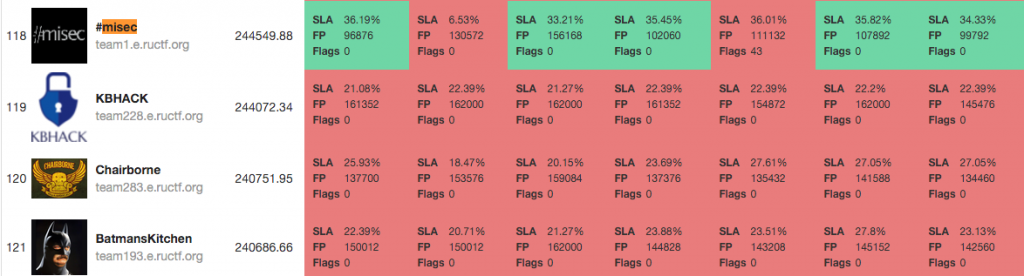
Since there were issues from the host, we tried to hold onto flags until we were able to reconnect to the scoreboard and turn them in.  This was risky because it was going on 2pm and the game was only live for another hour. As soon as Austen found a valid flag, the red team started running his script over different teams trying to get their apps to give up more flags. I made a couple modifications to his script on my box so that instead of going through 100 IDs on a team, then going to another team and so on, the script would ask me for what team to scan and wouldn’t iterate to a second team. I was able to use this modification to run a few scripts at once and try to grab as many flags as possible. As we were searching, we were able to find a good amount of flags. The second modification I was trying was to add inputs for the starting and ending IDs for the script. I couldn’t get it to work and didn’t know why until after the game ended when I asked Austen to look it over. I was still able to get 6 flags in the last ten minutes of the game and I was very excited to have contributed to increasing the team’s score. It felt amazing. At the end of the game, we were ranked 118th out of over 300 teams and I was proud to have helped and learned so much, especially since we climbed 3 ranks within the last few minutes!


ruCTFe partial scoreboard

Misec beat Batman

Conclusion


I want to give a huge shout out to Misec for pooling some great local talent into an awesome team. Thanks to Steven for organizing this year’s event and to Jason for building our infrastructure/network. Also, if it wasn’t for Austen, Brad, Amanda, Wolf, Ben and everyone else who helped me and made me feel like a member of the team. I wouldn’t have been able to learn as much as I did or have as much fun without you. I can’t wait to see what will happen at ruCTFe 2016!

- James Green


As you can see, for the junior members of your organization or team members that want to learn new or improve upon existing skills, participating in CTF type challenges is invaluable experience. They are well crafted scenarios that can put you and your team in real life situations. Somewhere that you are able to practice both defensive and offensive skills and learn from a variety of people in different information security roles. Many companies don’t have the time or resources to create such elaborate scenarios for the practice that is needed for responding and handling real threats. The communication and technical skills gained from this practice will give you the upper hand no matter what role you play.

There are a variety of types of CTFs from jeopardy style where you submit certain answers (flags) for points, or in the case of RUCTFE it was an attack/defense design. If you are interested in participating you can contact a local security group or visit https://ctftime.org/ for a listing of some of the current ones that are out there. Whether you show up to organize, teach, learn, or spectate I can guarantee that you’ll leave having learned something new.

Tuesday, September 22, 2015

Two-Factor Authentication: It’s not your mamma’s internet anymore.

The other day a friend of mine decided that it should be International Password Awareness Day.

“I am declaring today as International Password Awareness Day. After being in InfoSec for almost 20 years I have found that the single worst problem we have created is poor password hygiene. Not only do we make terrible passwords, we allow others to make even worse ones without holding them accountable. So let's all take a moment today to fix that. Change your password , ask your family, friends and coworkers to change theirs.” - Chris Nickerson

This is an amazing idea!! It should be the start of a movement for better passwords everywhere! Sometimes however, I get ahead of myself and have to take a moment to step back. I then realize that for the most part password strength still won’t matter. Don’t get me wrong, with the passwords that we’ve seen in recent breaches or professional engagements, 99% of you need to go change your passwords right now (to a good one).

Even as much as I am into information security, I still have some bad habits when it comes to my personal passwords. I keep most of them in an encrypted password safe program, I don’t use dictionary words, keep them complex, don’t reuse them, and keep them over 12 characters. One of the practices that I don’t keep up with (as much as I should) is changing my passwords at a regular interval. Honestly it’s a huge pain. Sure if there is a big breach I’ll go and change my important account passwords. What ends up putting my mind somewhat at ease for a majority of my accounts is using services that allow you to take advantage of Two-Factor Authentication as a method to strengthen the login process.

Two-Factor Authentication (2FA) is a method of identifying individuals by using two separate methods. While the number of services and websites that provide 2FA is increasing, we rarely think about it in our own enterprise environments. There are a surprising amount of companies and services that decided to implement 2FA after a large scale or high visibility breach. Shown below is the widely known AP Twitter hack that brought the stock market down in April of 2013.


Amazingly Twitter started offering 2FA in August of that same year, less than four months later. While you can argue that this specific hack may still have been possible as it was proven to be a phishing attack, it’s also likely that 2FA could have prevented it as well.


Why Two-Factor Auth?

2FA is not a new concept. It was patented in 1984 by Kenneth P. Weiss and has been slowly gainging popularity throughout the years. One of the first widley adopted methods of 2FA were the card and PIN at ATMs. Now that the need to protect so many digital assets has grown we are struggling to implement it in environments and sofware that may or may not be backwards compatible. As mentioned before however, passwords now are not enough when it comes to the shear amount and sensitive nature of the data we have now in cyberspace.


2FA Methods

The different methods of authentication are broken up into three categories

  1. Something you are.
    • Biometric (fingerprint)
    • Voice
  2. Something you have.
    • Physical token
    • Soft token
    • Card with magnetic strip
    • RFID Card
    • Phone (sms/app/phone call)
  3. Something you know.
    • Password
    • Passphrase
    • Pattern
    • Pin


Of course there are many ways that 2FA can fail to be the security blanket that we need, especially when it is implemented poorly. On top of doing your best to increase the complexity of your passwords it needs to be part of your defense in depth strategy and not just a bandaid for a compliance checkmark.


Threats


I’ll give you an example situation that I know for a fact has happened to several pentesters.

Company A decides that they want to implement 2FA by using the push notification or phone call method. A criminal or pentester comes along to break in by either phishing, using passwords from a recent breach, or a password brute forcing technique. Somehow they end up with a legitimate username/password combo, but they should be stopped from authenticating because of the 2FA right? Well in this case, the user gets the phone call or application alert that they have gotten so many times in the past. This notification doesn’t tell the user what they are supposedly logging into, so as a force of habit they acknowledge the alert or answer the phone call and press the # key. Boom the bad guy or pentester is in.

So the principle idea behind “Something you have” can take on different forms. In this situation it’s technically 2FA and allows Company A to be compliant but they are still not leveraging the security potential of the software. If they were to have that second form of authentication include a code as opposed to a single click or button, they would have been both secure AND compliant.

There are many other threats that I won’t get into right now. The bottom line is that passwords alone are weak, and adding 2FA strengthens that authentication method to be a deal more secure. In the words of Bruce Schneier:
“Two-factor authentication isn't our savior. It won't defend against phishing. It's not going to prevent identity theft. It's not going to secure online accounts from fraudulent transactions. It solves the security problems we had ten years ago, not the security problems we have today.”
Two-Factor Authentication is just another piece of the security puzzle. It’s not our savior for sure, but it is an essential part of defense in depth.

Friday, August 14, 2015

EMET and You

So first thing’s first. A little explanation of the Enhanced Mitigation Experience Toolkit (EMET) from Microsoft straight from their website:

What is the Enhanced Mitigation Experience Toolkit?
The Enhanced Mitigation Experience Toolkit (EMET) is a utility that helps prevent vulnerabilities in software from being successfully exploited. EMET achieves this goal by using security mitigation technologies. These technologies function as special protections and obstacles that an exploit author must defeat to exploit software vulnerabilities. These security mitigation technologies do not guarantee that vulnerabilities cannot be exploited. However, they work to make exploitation as difficult as possible to perform.

EMET also provides a configurable SSL/TLS certificate pinning feature that is called Certificate Trust. This feature is intended to detect (and stop, with EMET 5.0) man-in-the-middle attacks that are leveraging the public key infrastructure (PKI).


EMET is free, it’s a great tool from Microsoft, and you can go the manual route for installation, or head over to the TrustedSec blog for a post on how to automate it: https://www.trustedsec.com/november-2014/emet-5-1-installation-guide/


A great team member and friend of mine worked closely with me when implementing this technology across approximately 1,500 end devices including Windows 2008 and above, and Windows XP and above. Due to the sensitive nature of our applications, many of which were not stable or secure builds, we opted to perform the installs on our server platforms manually. We worked through a list of about 300 servers performing anywhere from 5-10 installs daily. As we were going through a PC refresh and upgrading everything to Windows 7 at the time we decided to install EMET on our base images after having our application team test the end user software.

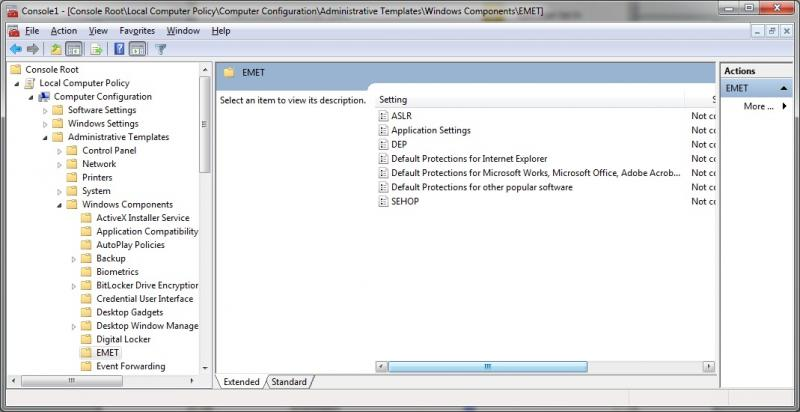
From our experiences we encountered few issues, which were easily solved by adding exceptions into our Group Policy.


Here is a list of some of the issues that we had encountered. While obviously not a comprehensive one, it will give you an idea of some of the more common pieces of software that we had seen issues with.


  • EMET with EAF battles Adobe Reader (All versions)
  • There is a known issue with EMET’s caller mitigation in Chromium since v34 (http://www.chromium.org/Home/chromium-security/chromium-and-emet).  Microsoft and the devs both say that there is no benefit to leaving EMET Caller mitigation turned on for chrome.exe.  They also recommend turning off SEHOP mitigation for chrome.
  • Msaccess.exe has to be allowed in both DEP and Caller.
  • Photoshop.exe has to be allowed in DEP.


With this tool the benefits greatly outweigh the administrative overhead. With a well thought out deployment and the Group Policy to control it. EMET is the icing on your security cake.

Thursday, May 21, 2015

Security Measures on a Budget - Part 4

Microsoft security, everyone’s favorite topic to poke fun at. For both the offense and the defense it is considered to be our job security, the bane of our existence, and sometimes an unobtainable goal. Whether we like it or not Windows Server and Desktop environments have their roots sunk deep into the infrastructure of the corporations and homes of the world. We must learn how to actively manage Windows environments without them getting away from us. How many of you can say that your home or work environment has completely removed depreciated operating systems? XP was end of life April 8th, 2014 and the extended support for Windows Server 2003 is coming up this July (https://support.microsoft.com/en-us/lifecycle/search/default.aspx). Just please do not tell me that you have anything prior than that on your network. I know there is a good chance that you do, just don’t tell me about it. It is scary enough some of the things that are out there on the internet. From old Windows 3.1 boxes, IP cameras, electrical control systems and more. HD Moore has a great talk about the scan of the internet that he performed over the whole year of 2012 and the data he collected on internet facing systems (https://youtu.be/VuYi7gVy3dI). Which includes a large amount of windows systems.
It is extremely hard to tell companies “Just patch/upgrade everything to where it needs to be”. I realize it is not just that simple. You may have business critical applications that only run on depreciated Operating Systems, the newest OS may not run on the hardware that you do not have it in the budget to replace, or maybe you just don’t have the time. Honestly most of these are just excuses in the mind of someone in information security. You are putting convenience, money, and time before protecting your critical assets. In an upcoming article I’ll cover asset and risk management is not something many do right, but it is one of the most important planning strategies that you can have.
Moving away from the obvious upgrades to current OS and software there are still many low cost or free enhancements that you can accomplish in Windows to create a more secure environment. Many can be accomplished via Group Policy (if you are in fact on an Active Directory Domain). Here are some links that I’ve always relied on and pointed others to for reference:

Best practices for GPOs (Group Policy Objects)
http://www.grouppolicy.biz/best-practices/
http://www.infoworld.com/article/2609578/security/the-10-windows-group-policy-settings-you-need-to-get-right.html
http://www.giac.org/paper/gsec/4138/group-policy-security-risks-practices/104227

Defend your Active Directory
https://youtu.be/uccM2xtE5SA - “Active Directory: Real Defense for Domain Admins”

Set local admin account passwords
http://blogs.technet.com/b/askpfeplat/archive/2014/05/19/how-to-automate-changing-the-local-administrator-password.aspx

Reduce the amount of people in Domain Admins. No one should be logging into their desktop as a domain admin. Ever. Period.

Fix everything listed here. Just do it
http://blog.spiderlabs.com/2013/09/top-five-ways-spiderlabs-got-domain-admin-on-your-internal-network.html

Implement EMET
Dave Kennedy has a great article on pushing it out domain wide. https://www.trustedsec.com/november-2014/emet-5-1-installation-guide/

Setup urlscan on IIS servers
http://www.iis.net/downloads/microsoft/urlscan

Setup bitlocker on laptops. 
This is a must if you have any chance of that laptop containing sensitive data that could be detrimental to your organization.

A few of these changes will cause growing pains as they are made, others not so much. Stronger password policies can cause the user populous to come after you with pitchforks if it’s not something that you have ever needed to change before. No cached credentials, windows firewall settings, and making changes to local system/service accounts can all create changes in process that not many people will be happy with. I’m not saying it’s easy, but these should all be a part of your overall security no matter how small or large your company happens to be.