Showing posts with label Hax0r. Show all posts

Monday, February 23, 2015

The Path to Fixing Security Awareness Training

Introduction
We all know that user education and security awareness as a whole is broken in its current state. What is it that we can do to strengthen our weakest link, people? How can we demonstrate with the right type of metrics that we are successfully implementing change and producing a more secure line of defense? We treat information security defense as a process, and we preach defense in depth. There is a large portion of the information security industry that is focused on perimeter security. However, we are beginning to see a shift from strictly the data level protection to an increase in user level security and reporting. The security as a process and defense in depth mentality must be filtered down and implemented into our user training.

Broken Processes

“The reason that most Security Awareness Training programs fail is because they are TRAININGS…. not Education.”[1]

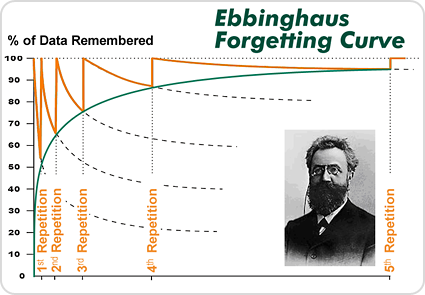
Experience and time in the industry shows that the Computer Based Trainings (CBTs) organizations require their employees to complete annually (or sometimes more often) are comparable to a compliance check box. It is a broken process. The employee is required to complete and pass this training for continued employment. Once the process is complete the knowledge is either forgotten or greatly reduced. One of the largest proven gaps occurs when the end user does not bring the information forward into their day to day working lives like they should. That is a large disconnect where it means the most. This is known as the Ebbinhaus Forgetting Curve. Repetition based on active recall has been demonstrated as effective in other areas for avoiding the curve and, therefore, is the foundational design such awareness programs should be based on.

“...basic training in mnemonic techniques can help overcome those differences in part. He asserted that the best methods for increasing the strength of memory are:
  1. better memory representation (e.g. with mnemonic techniques)
  2. repetition based on active recall (esp. spaced repetition).”[2]


Bridging the Gap
Repetition is a proven successful way to bridge the gap of compliance, teaching our users real life skills, and helping secure the infrastructure that we are responsible for protecting. This is best implemented with a comprehensive hands-on security phishing and awareness rewards program. A full program design will provide a maturity that the CBTs have not. While they are a good value add and can be used to reinforce the real life scenarios, relying on them as a primary means of security awareness training will not provide the value or insight to the first line of defense. By consistently reinforcing the CBTs with a custom built awareness program you increase the end user’s skills and boost the organization’s immunity to phishing and social engineering threat factors.

Building Your Own Program
Building a mature and strategic program from the ground up is achievable with executive support and cultural alignment. An awareness program need not equate to thousands of dollars spent on creating flashy presentations and brown bag luncheons to draw crowds. Teaching by example and rewarding for good behavior is what will improve upon the user’s awareness.

The point has never been to make everyone experts in security, it has always been to arm the employees with basic knowledge so that in the event something out of the ordinary occurs, it may help notify the security team.” [3]

An important takeaway and key point to remember is that it is not the employee’s responsibility to know the difference between a legitimate phish and spam, or that they should be hovering over links in emails before clicking. It is our job to have a program that is open enough and easy enough for them to report abnormalities or when something is not quite right.

1. Establish Objectives

The direction of an organization’s security awareness program should be tailor fit and reassessed periodically. With the constant changing threat landscape, maturity of user understanding, and a progressing industry, the objectives should be thought of as a moving target. An objective one year of decreased malware removals on desktops may mature past that to increased reporting of phishing/vishing attacks. However, establishing an aggressive set of objectives can result in a failed or unrealistic program. Concentrating on one or two achievable objectives at the beginning of a new program will allow you to accomplish a more specific goal. We can then adjust the target periodically to reflect the organization’s and program’s maturity.

2. Establish Baselines

Many organizations do not have formal security awareness training, so establishing a baseline should begin with a live fire exercise testing the skills and real world knowledge of a good subset of your users. Having a realistic outlook on where your security posture stands in relation to not only technical baselines, but also cultural norms should be standard practice. It is important to know how the users currently respond to threats and irregularities. Establishing an engagement with a certified and skilled penetration testing company can help you baseline these responses. By having a third party assess the skills of your users with professional phishing campaigns you will gain valuable insight into data that you may currently not have.

3. Scope and Create Program Rules and Guidelines

When the user or employee is being treated essentially as a customer, rules and guidelines should be well thought out and strategized. Miscommunications will only impede the learning process, making succeeding with the program more difficult. Align the rules to be consistent with the organization’s culture to have a higher adoption rate. Having multiple levels of input will enable you to have clear and concise program instructions and rules leading to an easier implementation.

4. Implement and Document Program Infrastructure

You are taught in driver’s education to wear your seat belt, look both ways, and adjust your mirrors. The first time you have a close call or even worse a real accident, you now have a real world experience that your mind falls back on each time you make a decision. It is the same with security awareness. The shock of the accident now gives the employee pause when future emails show up that may look a little odd and out of place. Afterwards the training teaches them what could possibly be at risk when they click through the illegitimate link. Setting up the phishing attacks to automatically redirect to a website that aligns with the program theme will create a connection between real life events and the message being presented for education.

5. Positive Reinforcement

One of the most important parts is letting them know that it is ok that they fell victim to the attack.  This must be a consistent message throughout the education material. The more comfortable the user feels reporting the incident, the more cooperation and adoption you will witness. Assure the user that it will always be better coming from an internal training attempt than a real phishing attack, and practice makes perfect. The training should include what to look for, and more importantly how to report something abnormal. With a great first line of defense and solid Incident Response (IR) procedures, you will be far better off securing the human element, the weakest security link.

6. Gamification

Gamification is actually a scientific term that roughly means applying game principles to a situation. The simplest definition of those principles is: 1) Goal establishment, 2) Rules, 3) Feedback, and 4) Participation is voluntary.[4]

Being able to reward for good behavior is an essential part of the program as well. Employees should not feel ashamed to come to the right people for help, or afraid of being reprimanded for making a mistake. Gamification works well in many aspects of life, why should this be any different? Turn the program into something catchy and a small budget cannot just satisfy your expectations, but exceed them. Making a lottery of gift cards, discounted services, and other items to enforce the brand of the program and put something in the user’s hand will reinforce the message you are giving.

7 . Define Incident Response Processes

Incident response (IR) looks different in every organization. If you have a current proven method of IR you are already well on your way to including an awareness program into your current structure. Use the newly created program as a case study for testing procedures and policies. This will allow you to flush out any inconsistencies, inefficiencies, or unplanned situations. Assessing each step of the process will give the needed information to add or change policies to fit the needs of the organization around certain types of attacks.

Gaining Meaningful Metrics

“Successful metrics programs include well-defined measurements and the necessary steps to obtain them” [5]
Measurements
There are an abundance of measurements to take throughout a security awareness program. Depending on your program and your goals you may have more tailor fit measurements to take.

Here are some common totals to track.

  • E-mails sent
  • Emails opened
  • Links clicked
  • Credentials harvested
  • Reports of phishing attempts
  • Emails not reported on
  • Hits on training sites

Tracking success rate and progress

Keeping track of click percentages, phishes reported, and incidents reported is a good start and necessary. However, charting your gains and losses with structured data over time will give your organization a deeper understanding of the progress made. Successful education and retained knowledge will be apparent with the increase and decrease of certain measurements and the success of goals set for metrics. Periodic assessment of shifts in metrics should be performed to assist with guidance of the education program’s goals and other possible implementations or changes in the current environment's security structure.

Important Metrics

Measures are concrete, usually measure one thing, and are quantitative in nature (e.g. I have five apples). Metrics describe a quality and require a measurement baseline (I have five more apples than I did yesterday).[6]

The metric of how much your security posture has increased in reference to your baseline is the key goal and quality control. Seeing increased reporting changes in suspicious activity on your network should align with a lower amount of malware, DNS queries to blocked sites, or other activity on the network that would lead an analyst to believe the possibility of a targeted attack has been blocked. The ability to link key metrics back to specific departments, buildings, or roles provides the information you need to scope more directed education.

 References
  1. https://www.trustedsec.com/march-2013/the-debate-on-security-education-and-awareness/
  2. http://en.wikipedia.org/wiki/Forgetting_curve
  3. http://ben0xa.com/security-awareness-education/
  4. http://www.csoonline.com/article/2134189/strategic-planning-erm/how-to-create-security-awareness-with-incentives.html
  5. Building an Information Security Awareness Program: Defending Against Social Engineering and Technical Threats - Bill Gardner & Valerie Thomas
  6. https://cio.gov/performance-metrics-and-measures/


Friday, November 21, 2014

Where to Start When Your Environment is Fucked

Lots of us have been there. You're new to an environment, they've hired you for infrastructure, security, networking, or some random odd analyst position. Whichever way it is, you come in and realize things aren't exactly where they need to be. After you get through the settling into your new desk and all the HR paperwork that keeps you busy for a full week you're ready to go. Some of you may be more proactive about this and might have gathered some intel about the company already. Which at least at that point you might get the gist that you're fucked before you even start. But honestly I love cleaning up a mess. You can't make it much worse, there is low hanging fruit a plenty, and it can be a thrill to actually get things working. Oh right! Wait! Are you on your way to compliance? Might as well throw good security practices at it and check off all the boxes on your way.

This isn't meant to be a full list, but will definitely get you started. I'll be making my personal recommendations of software, services and companies. I don't work for any of them, but I have my reasons for recommending them. If you ever have any questions, additions, or disagreements make sure to hit me up or leave a comment.

So let's start with the one you can do before starting, or hell even before applying.

1. Look for their IPs and/or domain on Shodan. It's kind of like googling your date before you go out. Except I'd rather fix and harden a thousand networks than try and change a man. If you end up seeing printers, xp workstations, telnet ports, sql servers and other horrifying things you can either run or ask for more money. You'll have your work cut out for you. I've had my issues using Shodan, but it's relatively cheap to buy credits. It seems that if you pay your searches will go through every time.

Now the rest of the steps I'll list may obviously vary depending on the state of the environment when you come into it. But I've found that (so far) going in this order yields decent results. Many people talk about how to get upper level management buy-in. My thought on this is that C-levels are still people too. Stop looking at them like they are rockstars or that they are out of touch with the company. There is no reason why you shouldn't just go and strike a conversation up with them about security and the importance of it. Of course try not to spout FUD all over the place when explaining it to them, but honestly security (or the lack of it) is scary!!!!

So what do you do when you get there?

1. Get buy-in - Not too difficult. Especially if you've found interesting things in your Shodan searching. Being able to tactfully let them know they are fucked is a good step. Don't stop there though. You had better have some good "what now" items to present them with as well. The other articles that I wrote about security on a budget are good places to start. I mean look at it from their perspective. Blue teaming is NOT their cash cow. Why should they spend money on security infrastructure if it doesn't improve their bottom line? Ooooh, but WAIT!! What happens when their revenue stream is compromised? Blue teaming is a huge component to cost avoidance.

2. Implement the free & easy stuff!!!
          - If you still need buy-in, download a trial of your favorite vulnerability scanner and scan all the things!!!! Giving a pretty report of lots of critical and high items on your list will help out tremendously as well.
          - Best practices for GPOs
http://www.grouppolicy.biz/best-practices/
http://www.infoworld.com/article/2609578/security/the-10-windows-group-policy-settings-you-need-to-get-right.html
http://www.giac.org/paper/gsec/4138/group-policy-security-risks-practices/104227
A lot of the changes will cause growing "groaning" pains as they are made. Like stronger password policies, no cached credentials, windows firewall settings, and making changes to local system/service accounts.
          -  Set local admin account passwords - http://blogs.technet.com/b/askpfeplat/archive/2014/05/19/how-to-automate-changing-the-local-administrator-password.aspx
          - Reduce the amount of people in Domain Admins. No one should be logging into their desktop as a domain admin. Ever. Period.
          - Fix everything listed here. Just do it.... http://blog.spiderlabs.com/2013/09/top-five-ways-spiderlabs-got-domain-admin-on-your-internal-network.html
          - Implement EMET - Dave Kennedy has a great article on pushing it out domain wide. https://www.trustedsec.com/november-2014/emet-5-1-installation-guide/
          - Disable telnet, logins over http, plain text passwords, open wi-fi, sslv3, no-shut ports that are unused, & setup port security.
          - Setup centralized logins for network devices. Use TACACS+ or radius
          - Setup urlscan on IIS servers http://www.iis.net/downloads/microsoft/urlscan
          - Setup bitlocker on laptops. This is a must if you have any chance of that laptop containing sensitive data that could be detrimental to your organization.
          - Network device configuration backups. Rancid works just as well as most of the paid ones. If you already have something that handles this then go for it and use that.
          - Install some pentesting flavor of linux and pop a box (obviously with written pre-approval). Yes this is a more advanced step and requires someone to sign off on it, but giving them their information on a white platter is another good step to gain some buy-in.
          - Patch your *nix boxes. If they were vulnerable to heartbleed (CVE-2014-0160) regenerate your SSL keys.

If this doesn't give you some sort of I.T. budget by now, I'm sorry. But if it does keep reading... well honestly I expect you to keep reading anyways... because I said so (in my mom voice).

3. Policies

Yea, I know.... NO ONE enjoys writing and creating policies. You have to talk to people and *shudder* collaborate. But you truly and honestly need them. Politics is a necessary evil and also there are several governing bodies that require certain policies. I am not a C-level anything by any means or even a management type person but it does take collaboration between the two to make policies that work and can be enforced.
          - http://www.sans.org/security-resources/policies/ TA DA - Take 'em and edit as you please. The SANS templates take the grunt work out of it and allow you to not spend all of your time trying to come up with the right way to say what you want to say.
          - Find out if you are required to comply to any governing body. PCI, SOX, GLB, etc. Checking boxes sucks, but it's got to be done.
          - Find out what is important to your organization. You need to make sure the right information is being protected.

4. Segmentation
          - For the love of God have a DMZ... BEHIND a firewall even. Have a firewall between that DMZ and the inside of your network also. Limit the amount of devices in your DMZ to devices that the internet needs access to. People and bots will be banging against these boxes and trying their best to get a foothold. Don't let that foothold be the end of your LAN.
          - Vlans and more vlans. While having seperate vlans is not a fool proof plan, it is part of the process. Having different silos for different purposes will help eventually for incident response, give you the capability to create ACLs between them, and if you are unfortunate enough to get a virus or botnet, it makes them less damaging.

6. Show me the $$$$$
          - Get a vulnerability scanner for realz. I am partial to Nessus. They also have just come out with PVS (Passive Vulnerability Scanner) that is pretty cool and gives you a real time view of what's going on over the wire.
          - Proper IDS/IPS/SIEM. I'm not too much of an expert on this. I've seen some implemented wonderfully and I've failed at implementing one before. I know it's needed but they need fine tuning and quite a bit of work to get them perfect. Make sure you are logging successful logins as well. If you see several failed and a successful (especially on off hours) that's a big blinky sign that you should catch.
          - Professional penetration testing. Hire a company the realizes the differences between a vulnerability assessment and a penetration test. I'm partial to TrustedSec, but Accuvant and Rapid7 are also both good companies as well.
          - Ideally all remote connections should require Two-factor. You should also follow the least-privilege rule with remote users. Check out Duo Security. It's a great company and they have some amazing support staff and engineers.

7. Extra stuff
          - If you need IP address management (IPAM) take a look at GestioIP. I've set it up and it works like a charm.
          - You had better not have your shared passwords stored in plain text. Get a password safe, or many. Free or paid they are worth it. If you're looking for enterprise level password safes, look at Thycotic (they have genius marketing as well)

Monday, February 3, 2014

Hackers Are People Too

We are hackers and we are proud.
We question and answer, we break and fix, we create and destroy, we attack and defend, we teach and are taught.
We provide value by inspiring others to do the same.
We care about the safety of your data!

Hopefully this article will help enlighten you to what a "hacker" truly is. We want to spread the word and break the negative stereotypes that come with the word and profession.

We'll start off with a couple questions.


1. When you think of a hacker what do you think of?

Some of the most prominent hackers in recent news would be Edward Snowden or Anonymous as well as other nameless groups or people. Most of these people/groups/activities have a negative connotation right? Nothing but a bunch of hi-tech criminals. But then again, most of the news that sells is negative. Who wants to write a story about the 99% of hackers that are doing good work in the local and global economies? Well, since you're here reading this article, it means this newspaper, website, blog, etc... feels that it is just as important.

The first time I actually considered myself a hacker was during my first trip to a “hackercon” (conference) called DerbyCon in Louisville, KY. When I arrived I was blown away at the sheer amount of knowledge and skill that I was surrounded by. I felt like a very small fish in a giant ocean. But I have to tell you, there wasn’t a single person that was too good to talk to me. They would strike up conversations as you walked by, while we were in talks learning, and if they saw you out in a restaurant. They were there to teach just as much as they were there to learn. The security practices and tools that I learned about that weekend not only would help the security of the organization that I work for, but the security of the data of everyone in the community. In those three days I realized that I wanted to work in Information Security and become a good hacker (aka “White hat”).

One thing that really upset me was during DerbyCon a reporter at WDRB in Louisville posted to his Facebook and Twitter account this

“I don’t know how I feel about this--DerbyCon happening at Hyatt downtown. It’s a convention for computer hackers. Sessions include password cracking, hacker war games and a lock picking pavilion. Thoughts?” - Sterling Riggs

This sparked some very hurtful comments from the residents of the city. Such as “The cops should be waiting to arrest anyone upon their arrival. It’s a shame that people have the brains to do stuff like that, but are too lazy to get a real job…” and “Should be outlawed”. We need to stop letting this fear mongering happen and stop participating in it when it does. As a single mom of three, I’ve had a steady job since I was 16 and would rather not go to jail for trying to help others.

Hackers are all around you. Hopefully bettering the company you work for, the hospital you need to visit, the stores you shop at, and the services you use. We’re there, but you don’t realize it because we’re doing our job to protect you and your data. Yes there are a lot of threats out on the internet, but with the bad come a whole lot of good.

An amazing group of hackers is Hackers For Charity (HFC) www.hackersforcharity.org. Hackers for Charity's Food for Work Program feeds hungry children in Africa but also teaches them to grow gardens to become self-sufficient. They have a whole group of volunteers that travel from city to city and attend hacker cons to raise money for this cause through auctions, t-shirts, zombie makeup drives, and more.

An extremely popular con is DEF CON. Located in Las Vegas, Nevada, DEF CON is possibly the largest con in the USA, drawing people from around the world.  In 2010, over 10,000 people attended DEF CON 18. At almost last minute notice project Bloodkode was setup to accept blood donations for a member of the community that had become ill. In the first hour all of the appointments had been filled, and they had to actively turn away donors. Bloodkode has now been expanded and will continue to collect donations at each DEF CON.


2. How many of you would purchase a car for your family that had never gone through crash or safety testing?

Companies of every size and every household should think of their data the same way. Wouldn’t you want to be for certain that your car wouldn’t blow up at the next pothole? Or that it had seatbelts, warning lights, airbags, etc? Well that’s a good analogy that describes why hackers break stuff! We enjoy and most times get paid to try and break into systems or make them do things that they aren’t meant to do. Because if we didn’t someone else would.

3. What questions can we answer for you? About our community, the work we do, or the lives we lead? Maybe you’re interesting in getting into this field of work as well?

#HackersArePeopleToo  <3 @Infosystir

Tuesday, December 24, 2013

T'was The Scan Before Christmas


Twas the scan before Christmas, when all through the NOCs
Not an admin was patching, not even for SOX.
The cat5 was strung up in beautiful spindles,
As the hope it would stay that way quickly dwindles.

The servers were nestled all snug in their racks,
While disks hummed and lights flashed on jacks.
The sysadmin in his Tux shirt, and I in my cap,
Had just hyped up on coffee to stave off a nap.

When on the monitoring screen arose such a clatter,
I turned just slightly to see what was the matter.
Away to my command prompt I typed in a flash,
Right-click, open, come to me bash.

I panic, I sweat, the desk meets my head,
What piece of shit did they successfully embed.
When, what to my wondering eyes should appear,
But a dude with no pants on, it was perfectly clear.

With a high-gain antenna along for his quest,
I knew in a moment it was a pentest.
More rapid than fiber his fingers did fly,
A grumble he made, the jr. admin starts to cry.

Now APT! Now phish! Now, vuln and attack!
On HIV! On, encrypt! On, cyber and crack!
To Hell we must go! Turn up the dubstep!
To deal with the vendors, cope with inept!

As the time comes around to check mark the boxes,
To keep vendors happy, those damn sly foxes.
So on to the testing, start up the scan,
Lets punch some holes in that software tincan.

And then, in a twinkling, I heard in his voice,
Spearfishing will be my method of choice.
As I drew in my head, and was turning around,
His eyes said don't worry, just CTF down.

He now spent time waiting, biding his time,
For what he had set was a victimless crime.
A shell he had wanted, now shown on his screen,
His face had lit up like an excited pre-teen.

His eyes-how they twinkled! His neck-beard so hairy!
His legs were so placid, his name, maybe Gary?
His teeth were clenched in a victory smile,
As he exported his findings to an ascii text file.

The scope he was given, made him laugh just a bit,
POS systems are not something to omit.
But write his report he shall do with a grin,
Oh, your whole network, the places he's been!

Default creds, sa password, and local admin,
PCI data, HIPAA, and click to login.
Metasploit helped with a bit of SET magic,
The board's quote? "This is fucking tragic."

He said no worries, we're here to help you out,
This place will be cleaned, beyond any doubt.
To defcon, derbycon, shmoocon you'll go,
Oh, all the wonderful things you'll now know!

He left in a fluster, red team let's leave!
These admins need some good time to greive.
But I heard him exclaim, ‘ere he stomped out of sight,
Pwny Christmas to all, and to all a good fight!

(What happens when I work on Christmas Eve)

Wednesday, August 14, 2013

1-2-3 SET

So yesterday was my second SE campaign to enlighten a subset of our users. Here is a n00b's guide written by a self proclaimed n00b....

Intro:

So using The Social Engineering Toolkit has been most of my hands-on knowledge when it comes to anything SE. I've only been using it for around 8 months at this point, and I've learned a little bit. When our company decided that it would be too expensive for regular user training we decided to try and make things interesting instead. The plan is still forming, but we've gotten good feedback so far.

The Plan:

The idea is to run a blatantly obvious SE attempt at a subset of users each month from a gmail account. I made the account ourITdepartment@gmail.com. SET will allow you to auth to gmail to send out the campaign email. The targets will receive a plain html email with a link that takes them to a credential harvester embedded in a cloned website of my choosing. After we obtain their credentials this is what they see:


This slideshow takes them through some normal "don't click shit" information, just in a professional format. I may upload the full slide deck, but it still needs a little work. As time goes on and we get less hits, we'll up the complexity.


First Attempt:

Using ./theHarvester.py from Marcus Carey (@marcusjcarey) I scanned for our domain to pull the first list of users, which got me about 50.

./theHarvester.py -d mydomain.com -l 500 -b google

Every year we fill out an employee survey with a third party company. Since we had just completed it I figured an email about the survey results being in would yield a good hit rate.

The link took them to a clone of Survey Monkey's login page. Which yielded a surprising 15/50 credentials being harvested, 3/50 reports of a suspicious email to our helpdesk, and 1 call from a nurse letting us know that she no longer has any respect for us and has lost our trust.

Second Attempt:

To gather a list of users that are more likely to be targeted from the outside we have an active sender list on our postfix mail filtering box. There are about 600 or so that normally get email from outside addresses, out of the 1,400 total mailboxes we have. I took the first 200 this month and will continue on until everyone has been hit with an easy campaign.

At the beginning of the year we switched to an HR system "in the cloud" that uses AD Federated Services to auth our users. I figured a clone of that site would work well, accompanied with this email.


So far we are at 47/200 and they are still rolling in.


1-2-3 SET:


What Comes Next?
So we're currently working on a database to bind to MS Active Directory and store the results of each month. It would allow us to run reports on most phished users, who each campaign hits, etc. All the data from the xml report will be pulled in also.